Passwords are still how most small businesses get breached. The Colonial Pipeline ransomware incident traced back to one compromised VPN password, and the company paid roughly $4.4 million. Attackers rarely need a zero-day when a phished password will do. Passkeys close that gap — but “go passkey” immediately forks into a decision: synced or device-bound?
This is the comparison that matters for a 5-, 20-, or 100-person company, walked through the five things you will actually have to manage: security, onboarding, device replacement, account recovery, and administrator control.
The two types, in plain terms
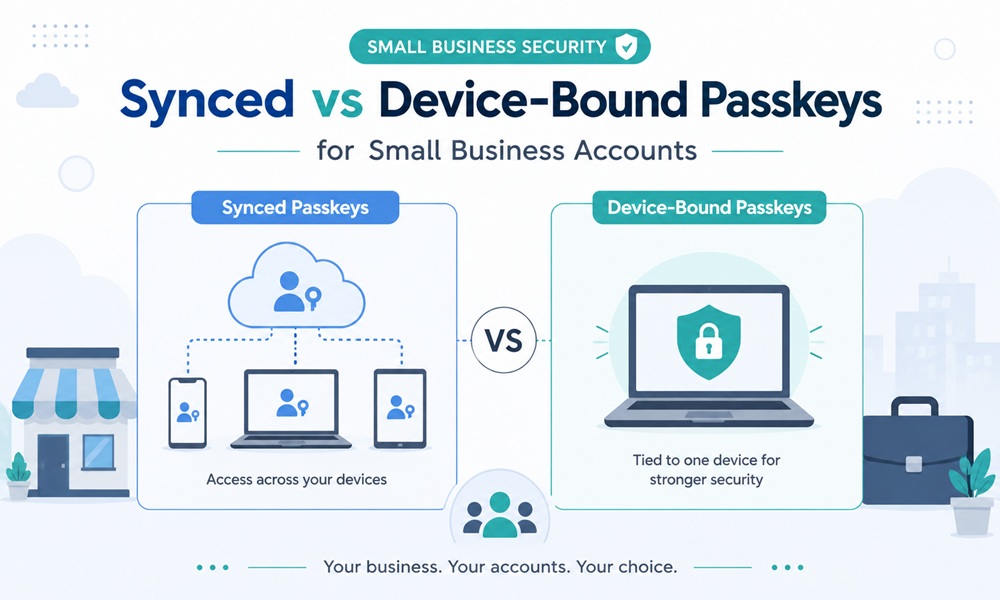
Synced passkeys live in a cloud vault — iCloud Keychain, Google Password Manager, or a password manager like 1Password — and follow the user across all their devices. Set one up on a phone and it is on the laptop too.
Device-bound passkeys never leave the hardware they were created on: a phone’s secure chip, a Windows Hello machine, or a physical security key such as a YubiKey or Google Titan. They cannot be exported, copied, or synced. That is the point.
| ASSURANCE LEVELS — THE DETAIL BUYERS MISS
Under the US NIST 800-63B guidance, synced passkeys meet AAL2 — phishing-resistant and strong enough for general workforce use without hardware. Device-bound credentials on a security key or smart card reach AAL3, the bar for your highest-risk systems. (Windows Hello for Business sits at AAL2.) If you are not in a regulated industry, AAL2 synced passkeys are already a massive upgrade over passwords. |
Head-to-head on the five things you manage
Each row is a real operational question. The right column is the honest trade-off.
| What you’re managing | Synced passkeys | Device-bound passkeys |
| Security & assurance | AAL2; phishing-resistant. Risk shifts to the cloud account (Apple ID / Google / vault). | AAL3 on hardware keys. Cannot be exported or remotely stolen. Gold standard for admins. |
| Employee onboarding | Fast. New hire signs into their vault and is ready in minutes. | Slower. You must issue, ship, and register physical keys before day one. |
| Device replacement | Painless. New laptop or phone, sign in, passkeys reappear. | Friction. A new device needs the key re-registered; a lost key needs a spare. |
| Account recovery | Vault account recovery (recovery key, phone, code). Robust if set up. | Device loss = credential loss. Needs a separate high-assurance recovery process. |
| Admin control | Limited. Lives in personal clouds you don’t own; control is at the identity provider. | Strong. You own the hardware; issue, replace, and revoke centrally. |
| Cost | Free (platform vaults) or a few dollars/user (managed vault). | ~$25–$70 per key, plus shipping, spares, and lifecycle admin. |
Where each one genuinely wins
Synced passkeys win for the everyday team
For sales, support, marketing, and ops staff logging into SaaS tools all day, synced passkeys are the obvious default:
- Onboarding is self-service — no hardware to buy or ship.
- Browser support sits at 97–100% across modern browsers, so it just works.
- Device upgrades do not generate help-desk tickets.
- They are dramatically more secure than the passwords they replace, at zero hardware cost.
Device-bound passkeys win for privilege and shared machines
Reach for hardware keys exactly where the blast radius is largest:
- Anyone with admin, finance, or infrastructure access — AAL3 is worth the friction here.
- Industries with compliance demands that mandate hardware-backed authentication.
| THE SHARED-WORKSTATION CASE MOST ARTICLES IGNORE
Shared workstations are the single most common barrier in business passkey rollouts — cited by 31% of organizations in an HID/FIDO Alliance survey. Synced passkeys assume a personal device; a shop floor, clinic, or retail counter has none. The clean fix: give each employee a hardware key they carry and tap into any shared machine. The workstation is not the authenticator — the key is. This pattern is built for manufacturing, healthcare, and retail. |
The disadvantages nobody puts on the sales page
Device-bound downsides
- Lost key, lost access. No spare means a locked-out employee and an emergency recovery process.
- Lifecycle overhead. Someone has to buy, ship, register, replace, and revoke keys — real admin work that synced passkeys simply do not create.
- Cost scales with headcount, and you generally want two keys per person for redundancy.
Synced downsides
- You don’t own the vault. Credentials sit in employees’ personal Apple, Google, or password-manager accounts. Your control is at the identity provider, not the device.
- Personal-device reluctance. Staff may resist enterprise controls on personal phones, leaving enforcement gaps.
- The vault account becomes the target. Security is now only as strong as that Apple ID or Google account — protect it accordingly.
Onboarding and offboarding: the part that decides your real cost
Day-one access has a classic chicken-and-egg problem: a new hire needs to authenticate to register a passkey, but has no credential yet. The standard answer in business identity platforms is a Temporary Access Pass (TAP) — a short-lived, single-use code that lets a new employee enroll a passkey without ever being given a password. For high-assurance roles, pair it with identity verification at enrollment.
Offboarding is where the two models diverge sharply, and most comparisons skip it:
- Device-bound: you physically collect the hardware key and revoke it centrally. Clean and verifiable.
- Synced: you cannot reach into a departing employee’s personal iCloud to delete their passkey — you revoke access at the identity provider instead, which disables the credential’s usefulness even though the copy still exists. That is fine, but only if your accounts are centralized behind an IdP. If staff log into tools directly, offboarding gets messy fast.
A simple model that fits most small businesses
You do not need to choose a side. Use a tiered approach:
- General staff → synced passkeys. Free, fast, phishing-resistant, AAL2. This covers most of your team.
- Privileged users → device-bound hardware keys. Admins, finance, IT, owners. AAL3, company-owned, two keys each.
- Shared/kiosk machines → carried hardware keys. One key per worker, tap into any station.
- Everyone → centralize behind an identity provider and keep one non-passkey recovery path per account, so onboarding, recovery, and offboarding all run from one place.
Plan for portability while you are at it. The FIDO Alliance’s Credential Exchange Protocol (built with Apple, Google, Microsoft, 1Password, Bitwarden, and Dashlane) is maturing toward letting users move passkeys between vaults. It is still in active development, so do not tie your rollout to a single platform’s vault — keep accounts IdP-centralized and you stay flexible.
Frequently asked questions
What is the best passkey type for a small business?
A tiered mix. Synced passkeys for general staff (free, easy, AAL2) and device-bound hardware keys for privileged accounts and shared workstations (AAL3, company-controlled). Forcing one type on everyone is the usual misstep.
Are synced passkeys secure enough for business use?
For the general workforce, yes — they meet AAL2 and are phishing-resistant, a major upgrade over passwords. For admin, finance, and regulated workloads, step up to device-bound hardware keys at AAL3.
What are the main disadvantages of device-bound passkeys?
Lost hardware means lost access, you need spares, and there is real lifecycle overhead in issuing, replacing, and revoking keys. They cost more per user, too. The upside is total enterprise control and the highest assurance level.
How does passkey account recovery work in a company?
For synced passkeys, through the vault’s account recovery (recovery key, phone, or code) and access control at your identity provider. For device-bound keys, through a pre-registered spare key plus a high-assurance re-enrollment process. Either way, never run a passkey-only account with no fallback.
Decide by role, centralize behind an identity provider, and you get the best of both: a frictionless team and locked-down privilege.